
Guide to Apache Spark: Spark Session/Context, Driver, and Executors Explained

Assuming you have an understanding of the architecture of Apache Spark, you understand that Spark is a distributed computing engine powered by clusters of machines.
But how does Spark actually start?
Who controls the application?
Where does the computation run?
In this article, we break down three core components that every Spark developer must understand:
SparkSession / SparkContext – how a Spark application begins
Driver Program – the “brain” of a Spark job
Executors – the workers that actually process data
By the end, you’ll understand how Spark organizes a job from your laptop all the way to the cluster.
What is SparkSession (and SparkContext)?
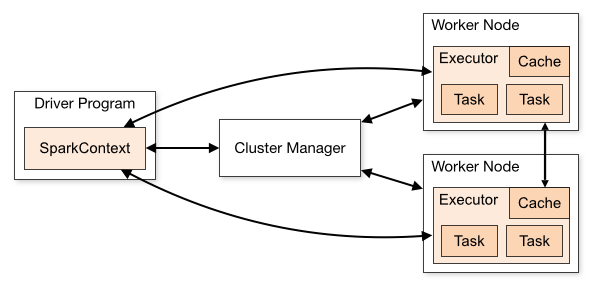
When you write any Spark code, you start with this:
from pyspark.sql import SparkSession
spark = SparkSession.builder.appName("Demo").getOrCreate()
This creates a SparkSession – the entry point for using Spark. When you create a SparkSession, it internally creates a SparkContext.
SparkSession in simple words
SparkSession is the main gateway to all Spark functionality:
Create DataFrames and Datasets
Run SQL queries
Connect to data sources (CSV, Parquet, Hive, S3…)
Access Spark’s internal context
Before Spark 2.0, we used SparkContext directly. Now, SparkSession wraps SparkContext + SQLContext + HiveContext into one unified object i.e.,
SparkSession = SparkContext + SQL abilities + Catalog + Configurations
SparkSession and SparkContext Example:
spark = SparkSession.builder.appName("App").getOrCreate()
df = spark.read.csv('\path\to\csv')
# Access SparkContext
sc = spark.sparkContext
print(sc.master)
rdd = sc.parallelize([1, 2, 3, 4, 5])
So SparkSession is for developers, SparkContext is the underlying engine.
Note: You can create multiple SparkSession objects in an application as long as their SparkContext is same. Spark only allows 1 SparkContext object per JVM. It will throw an error if you try to create another one. In order to have multiple SparkContext you need to update the property spark.driver.allowMultipleContexts = True
What is the Driver in Spark?
When you run a Spark program, the first process that starts is the Driver. It creates the SparkContext and runs the main() function.
Think of the Driver as the “master controller”
The Driver is responsible for:
Converting code into tasks
Creating the logical and physical DAG
Coordinating executors
Tracking task failures and retries
Returning results to the user
In simple terms: The Driver plans the work. Executors do the work.
Where does the Driver run?
On your laptop, if running locally
On the cluster master node, when running on YARN/Kubernetes/Standalone mode
If the Driver crashes → the whole Spark job fails.
The Driver itself has 3 main components:
JVM: JVM runs the main() function, maintaining application flow. It breaks down logical plan into physical execution stages and schedules tasks for each stage.
Scheduler: It plays a critical role in Driver program by managing the allocation of tasks to cluster’s worker nodes. It ensures efficient task execution by considering cluster’s resources.
Cluster Manager: It is intermediary between driver and infrastructure. It managers resources, schedules application execution, monitors nodes.
What are the challenges with Spark Driver?
Memory management and optimization is an important factor to consider during the development. As it is a single process within Spark, it holds all tasks, variables, and data (e.g., collect operation) in memory. If operation requires large amount of memory, it can lead to OOM (Out-Of-Memory) errors leading to failure.
It also lacks fault tolerance itself as it is a single point of failure for the application. Enabling checkpointing or using cluster nodes to auto re-launch the driver can help mitigate the problem.
Scalability can be a challenge as the performance will go down as the dataset size or operation complexity increases.
Overhead of data serialization and network communication between driver and worker can negatively impact performance.
Note: Each Spark Driver corresponds to a single application. A cluster can run multiple Spark application but each will have it’s own driver program.
What are Executors in Spark? (The Workers)
Executors are the distributed processes that Spark launches across the cluster. They are responsible for:
Running individual tasks
Storing data in memory or disk
Caching DataFrames/RDDs
Sending results back to the Driver
Executors live on worker nodes, not on the Driver. Every Spark job launches executors in a cluster and assigns tasks to them.
How are Executors fault tolerant?
They are designed for reliability.
Task Failure: Executors retry failed tasks, coordinated by Driver.
Executor Failure: Cluster manager re-launches failed executors and driver re-assigns the tasks.
Checkpointing: Saves the data to disk (HDFS) to truncate lineage for long jobs.
A Simple Execution Story
You write code in PySpark or Scala
SparkSession starts and connects to the cluster
The Driver analyzes the code and creates a DAG
Data is split into partitions
Executors process tasks in parallel
Results are sent back to the Driver
This is the heart of Spark execution. Understanding these components helps you:
Tune performance (memory, cores, executors)
Debug failures (Driver OutOfMemory vs Executor failure)
Use cluster managers efficiently
Build scalable ETL and streaming pipelines
Many Spark developers run code for years without realizing how it actually executes — mastering Driver, Executors, and SparkSession is a big step toward real expertise.
Mini PySpark Example to See It in Action
from pyspark.sql import SparkSession
spark = SparkSession.builder
.appName("Basics")
.master("local[*]")
.getOrCreate()
df = spark.range(1, 1000000) print("Partitions:", df.rdd.getNumPartitions())
df.select((df["id"] * 2).alias("value")).show(5)
SparkSession initializes Spark → Driver starts
Driver creates tasks on partitions
Executors compute
id * 2Driver prints result
What’s Next?
Now that we’ve covered the building blocks of a Spark application, the next concepts naturally follow:
Jobs → Stages → Tasks (how Spark breaks down computation)
Lazy Evaluation & DAG (how Spark optimizes work)
Check our other article in this Apache Spark series, and explore our other Spark tutorials on RDDs, DataFrames, and memory management.